Journal15 min read
What Is Agentic Video Editing? 7 Tools Leading the Category (2026)
Agentic video editing means an AI agent plans and runs your edit. Here is what the category is, plus 7 leading tools with real 2026 pricing.
- Published
- Updated
- Written by
- AllCapStudio

A two-minute product demo can take three days to edit, and most of those hours are mechanical. Renaming 200 clips, syncing two camera angles, cutting filler words out of a 40-minute screen recording, correcting caption timing. None of it needs a creative decision, and all of it comes before the first one.
You have probably bought an AI feature that promised to remove some of that work. Most of them do one task and then wait for the next instruction, so the time they save is measured in clicks while the work is measured in hours.
Agentic video editing is the category built to take the whole sequence at once. This guide covers what the term means, what these tools can and cannot do today, and the seven platforms leading the category in 2026, with real pricing and honest limits on each.
What is agentic video editing?
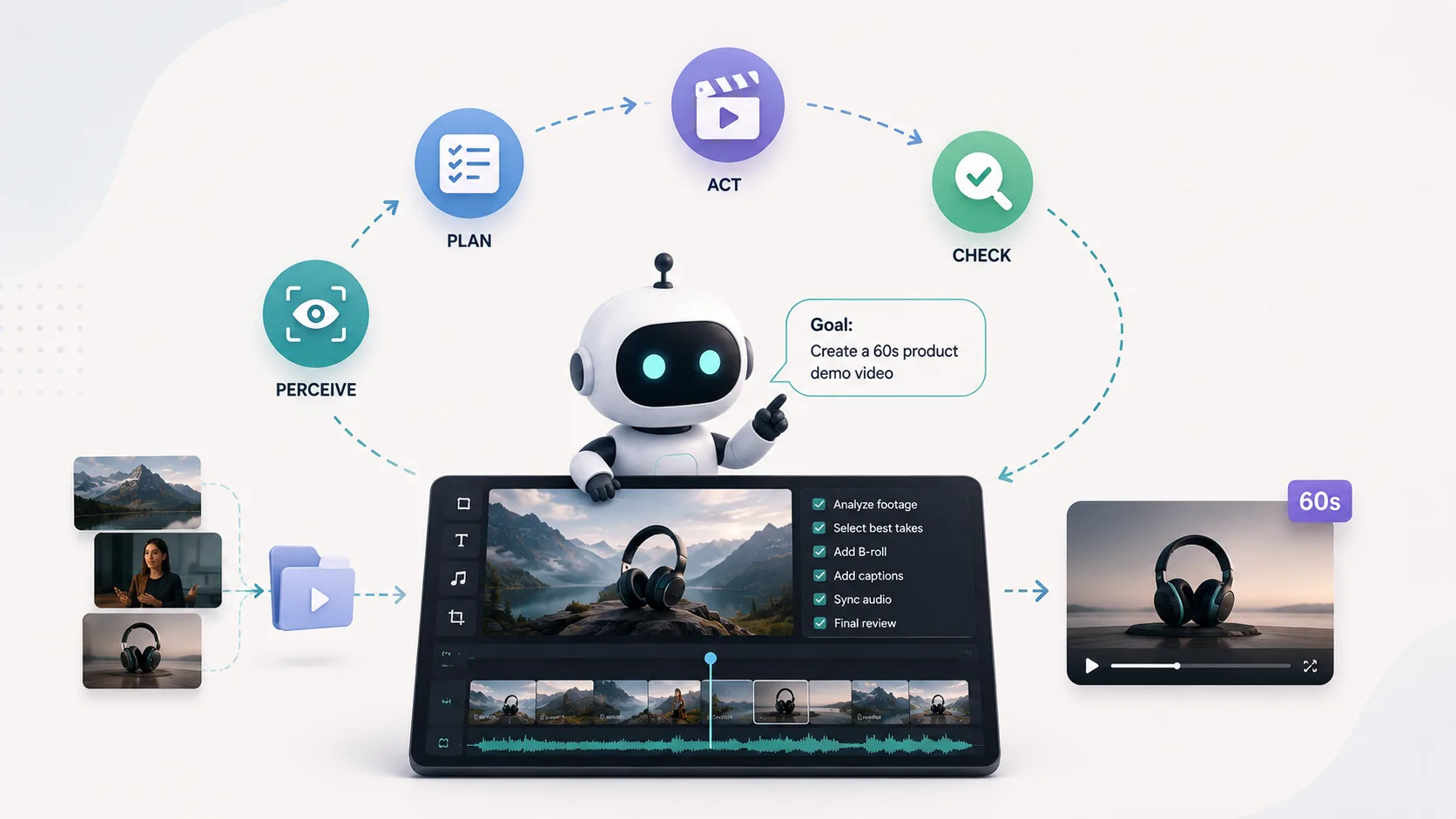
Agentic video editing is video editing where an AI agent holds the plan. You give it a goal in plain language, and it decides which operations are needed, executes them in order, evaluates the result, and revises when the result is wrong.
The distinction sits in who sequences the work. An AI feature does one thing when you press it. An agent decides what to press.
Andreessen Horowitz put a marker in the ground on this in January 2026, arguing that vision models can now watch and understand large volumes of footage while agents can analyse, plan, and operate editing tools on someone's behalf. Their framing of the timeline was blunt, calling 2025 the year of video and 2026 the year we hand the editing to agents.
Two developments made that possible. Multimodal models became reliable enough to identify scenes, speakers, and usable takes without a human verifying every call. And the tools themselves became addressable, either through APIs, plugin panels, or project files an agent can read and rewrite.
The loop an editing agent runs
Every tool in this guide runs some version of the same four steps.
Perceive: The agent transcribes, scans, and tags the footage so it knows what exists and where.
Plan: It breaks your instruction into an ordered set of operations.
Act: It executes those operations against a timeline, a project file, or a render pipeline.
Check: It compares the output against your instruction and revises the parts that missed.
Agentic versus assistive AI editing
What changes | Assistive AI editing | Agentic video editing |
|---|---|---|
Who decides the steps | You | The agent |
Input | A button press per task | One instruction covering several tasks |
Scope of one action | A single operation | A multi-step workflow |
Failure mode | You get a poor result and redo it | The agent misreads intent and you redirect it |
What you review | Each output as it arrives | The assembled result |
Both are useful. Only the second removes a whole stage of work rather than a single step.
What agentic video editing can and cannot do today
We run these tools on client projects every week. The gap between what the marketing says and what the software does is consistent enough to describe.
Agents are strong on the mechanical layer. Ingest, transcription, bin structure, multicam sync, silence and filler removal, caption generation, aspect ratio variants, and rough assembly all land reliably. On a three-day demo edit, that is most of the first two days.
Agents are weak on the decisions that determine whether a video works. Pacing, emotional timing, which of two good takes carries more conviction, and whether the argument in the script is the right argument at all. The same limit applies to an AI marketing agent, which can run the mechanics of a campaign without deciding what the campaign should say.
So most teams let an agent take the first pass and finish by hand. Budget for the finishing, because no tool on this list has removed it.
The 7 tools leading agentic video editing in 2026
These seven tools approach agentic editing from different angles, from footage prep and rough assembly to animation, repurposing, and generative edits. What connects them is that each can take over a sequence of editing decisions rather than waiting for you to trigger every step manually.
1. Adobe Premiere AI Assistant
Adobe Premiere shipped its creative agent across Creative Cloud on 18 June 2026, putting AI Assistant into public beta in Premiere, Photoshop, Illustrator, Frame.io, and InDesign. Inside Premiere it works on the project panel and the timeline, taking an outcome you type or say and planning the steps needed to reach it. What comes back is a normal, editable sequence, so nothing about an existing Adobe pipeline has to change.
How the agent works
Project setup: Creates and organises bins, moves and renames clips, and applies colour labels from an instruction.
Media prep: Generates transcripts, syncs multicam angles, and tags footage using computer vision.
Rough assembly: Builds a working starting sequence from a described outcome, including soundbite and b-roll structure.
Retrieval: Finds assets and quotes when you describe them in your own words rather than by filename.
Where it falls short
Beta volatility: Public beta, so behaviour and credit limits are still moving, and teams with strict approval chains should test on a low-stakes project first.
Credit ceiling: Agentic actions draw on generative credits, and the single-app plan includes 25 a month before you buy more.
Pricing
Premiere single app: $22.99/mo billed annually, or $263.88 prepaid for the year
Creative Cloud Pro: $69.99/mo billed annually
Best suited to teams already working in Premiere that want to automate footage prep, organisation, and rough assembly without changing their existing workflow.
2. Mosaic
Mosaic is a browser-based platform built around a node canvas instead of a timeline. You connect tiles to define an editing workflow once, then run it across many videos, which makes the unit of work a process rather than a single edit. It raised a $3.8M seed round in 2026 and names TubeScience and News Corp among its partners, both of which run video at volumes where a reusable process beats a fast single edit.
How the agent works
Canvas: Each node is an action such as trim, caption, reformat, or export, chained into a workflow that runs on its own.
Clips: Scans long-form footage and surfaces the segments worth cutting, then feeds them into the canvas.
Variant generation: Produces multiple edits from the same raw footage, which suits paid social testing.
Handoff: Exports timelines to Premiere Pro, Final Cut Pro, DaVinci Resolve, and MAM platforms.
Where it falls short
No trial: No free plan, so evaluation starts with a paid month spent learning a node canvas rather than a timeline.
Finishing gap: No offline editing and no colour grading depth, so a finishing pass elsewhere is still required.
Pricing
Creator: $50/mo for 2,500 credits and 120-minute uploads
Pro: $150/mo for 10,000 credits, 300-minute uploads, API access, and team collaboration
Enterprise: custom
Makes the most sense for high-volume teams where building one reusable editing workflow can save time across dozens or hundreds of videos.
3. Descript
Descript edits video by editing its transcript, and its Underlord agent sits on top of that. Because the document and the timeline are the same object, telling the agent to drop a rambling answer is the same operation as deleting a paragraph. That removes most of the translation between a producer's note and an editor's action, which is why it suits anything built around people talking.
How the agent works
Prompt-driven editing: Takes a described outcome and returns a polished cut rather than a single applied effect.
Cleanup passes: Removes filler words, tightens silences, and applies Studio Sound across a project.
Repair tools: Eye Contact, Green Screen, and voice work run as agent-callable steps inside the same session.
Multi-step chaining: Combines several of the above from one instruction.
Where it falls short
Two meters: Media hours and AI credits draw down separately, and every file uploaded counts against the first, so multicam and multi-track workflows drain the allowance fast.
Narrow format: Built around spoken word, so it adds little to a motion graphics or animation project.
Pricing
Hobbyist: $16/mo billed annually, 10 media hours and 400 AI credits
Creator: $24/mo billed annually, 30 media hours and 800 AI credits
Business: $50/mo billed annually, 40 media hours and 1,500 AI credits
A strong fit for interviews, podcasts, webinars, and talking-head content where editing the transcript effectively means editing the video.
4. CoAnimator
CoAnimator is an agentic animation studio where an AI agent becomes your co-animator. It is agent agnostic, so the one you already use, whether Claude Code, Codex, Gemini, or OpenClaw, researches your product and drafts the script before building, with a local stage hot-reloading as scenes take shape. Templates and plugins extend the range across motion graphics, narrated explainers, effects over real footage, and WebGL 3D.
How the agent works
Create by describing: A demo, launch video, or tutorial builds scene by scene, and you redirect at any moment.
Edit by describing: Name the look, and effects, captions, and overlays land on your own recording.
Always-editable projects: Files are git-friendly with nothing baked in, so changing one scene weeks later is an edit and a re-render.
Local rendering and the coa CLI: Unlimited offline exports on Windows, macOS, or Linux keep unreleased work on your machine, and the same renders run headlessly from CI for changelog videos.
Where it falls short
Agent-dependent output: Best results depend on the AI agent you connect, so output quality varies with which agent you point at the project and how much direction you give it.
Customisation reach: Further workflow customisation can require plugins or external tools, depending on what you want to add to the final video.
Pricing
Free: $0 forever, unlimited local renders, 720p with a watermark
Worth trying if your videos are demos, launches, or tutorials that get outdated by product changes and you would rather re-render than re-shoot.
5. Remotion
Remotion renders video from React components, which makes the project a codebase an agent can read and rewrite with the same tooling it uses for software. Its licence terms now define a seat as one person who either writes Remotion code themselves or uses agentic coding tools to do it. The project predates the current wave of agentic tools by several years and lists more than 300 customers.
How the agent works
Code as the timeline: Scenes, timing, and transitions are components, so an agent edits video the way it edits an app.
Data-driven output: One composition renders hundreds of variants from a data source.
Pipeline rendering: Renders run locally or on self-hosted cloud infrastructure, including from CI.
Version control: Every change is a diff, which makes review and rollback ordinary.
Where it falls short
React dependency: Someone on the team needs to be comfortable in React when the agent gets stuck, and the template library is thin next to mainstream editors.
Licence trigger: Paid licensing kicks in on company headcount rather than seat count, which catches teams by surprise at four people.
Pricing
Free: individuals, non-profits, and for-profit companies of three or fewer people
Creators: $25/seat/mo with no seat minimum
Automators: $0.01/render with a $100/mo minimum spend
Enterprise: from $500/mo
Ideal when video is generated repeatedly from product data, templates, or code and your team is already comfortable working with React-based workflows.
6. OpusClip
OpusClip turns long-form recordings into short vertical clips, and its Agent Opus layer handles the surrounding production steps. Its ClipAnything model works across vlogs, gaming, sports, interviews, and explainers rather than talking heads alone, which separates it from the first wave of podcast clippers. It works as one stage in a pipeline rather than an editor, taking footage you already have and returning finished shorts.
How the agent works
Clip selection: Scores and extracts segments from a long recording without you scrubbing through it.
Finishing: Adds animated captions in 20+ languages, hooks, keyword highlighting, and object tracking.
B-roll and audio: Agent Opus generates B-roll, voiceovers, dubbing, and speech enhancement.
Distribution: Schedules and posts to YouTube Shorts, TikTok, and Instagram Reels from inside the tool.
Where it falls short
Credits by source length: One credit is spent per minute of source video, so a 60-minute podcast costs 60 credits whether it yields 5 clips or 20.
Expiry and reject rate: Storage and exports expire after roughly 30 days, and you should expect to discard a meaningful share of generated clips before publishing.
Pricing
Free: 60 credits per month
Starter: $15/mo, monthly billing only, 150 credits
Pro: $14.50/mo billed annually at $174, 3,600 credits granted upfront
Business: custom, and the only tier with 4K download
Best for teams consistently turning podcasts, webinars, interviews, and other long-form recordings into short social clips.
7. Runway
Runway sits at the generative end of the category. Aleph 2.0 edits existing footage from text instructions and Workflows chains models and steps into repeatable pipelines, which is what earns it a place here rather than in a list of video generators. One subscription covers Runway's own models alongside licensed third-party ones, making the platform a routing layer across most of the current frontier.
How the agent works
Directed edits: Aleph adds or removes objects, relights a scene, or changes camera angle on footage you already have.
Workflows: Chains generation, editing, and upscaling steps into a pipeline you can rerun.
Model coverage: Gen-4.5, Act-Two, Veo 3.1, Kling 3.0 Pro, and Seedance 2.0 all sit behind the same credit pool.
API surface: Exposes the same models programmatically for teams building their own pipeline.
Where it falls short
Credit burn: Credit maths is unforgiving, with Aleph editing running around 140 credits per five seconds, and regenerations you request because you dislike the output are not refunded.
Disclosure risk: Generated footage carries brand risk that needs a disclosure policy before it ships.
Pricing
Free: 125 one-time credits
Standard: $12/mo billed annually, 625 credits per month
Pro: $28/mo billed annually, 2,250 credits per month
Max: $76/mo billed annually, 9,500 credits per month
Most useful when the edit requires footage or visual changes that cannot easily be captured through a conventional reshoot.
The Seven Tools Compared
These seven differ by architecture more than by feature list. Where the agent does its work decides what you hand it, what comes back, and how long the tool takes to learn.
Tool | The agent works on | Ease of use | What you get back | Entry price |
|---|---|---|---|---|
Adobe Premiere AI Assistant | Your existing Premiere project | Familiar to Premiere editors, steep to anyone else | An editable Premiere sequence | $22.99/mo |
Mosaic | A reusable node canvas | Steep, because you build the workflow before the video | Edits plus timelines for Premiere, FCP, Resolve | $50/mo |
Descript | The transcript | Easy, because editing works like a document | A finished cut and exports | $16/mo |
CoAnimator | Local projects | Easy to build, because you describe the video and the agent writes it | MP4 rendered on your machine | Free to start |
Remotion | A React codebase | Hard without React on the team | Video rendered from code and data | Free under four people |
OpusClip | Long-form uploads | Easiest here, upload and choose a format | Captioned vertical clips | Free |
Runway | Existing and generated footage | Easy to start, harder to control the spend | New or altered footage | Free |
Which agentic editing tool fits your workflow
Pick by where your time goes. The tool that demos best is rarely the one that clears your specific bottleneck, so find yours below and start there.
Footage prep and project setup: Adobe Premiere AI Assistant, because the agent works inside the project structure your editors already use and the output stays a normal sequence.
Volume across many videos: Mosaic, because one workflow built well runs across everything afterwards and the per-edit cost falls as output rises.
Talking-head cleanup: Descript, because transcript editing collapses the gap between a script note and a cut.
Videos that go stale when the product changes: CoAnimator or Remotion, because both keep the video as files you re-render rather than a finished export you rebuild. CoAnimator suits teams directing through a coding agent, and Remotion suits teams who already ship React.
Repurposing long-form into clips: OpusClip, because clipping is a well-defined job and a dedicated tool beats a general one at it.
Shots that do not exist yet: Runway, with a plan for how you will label generated material when it reaches an audience.
One caveat before you buy anything. Plenty of teams diagnose an editing bottleneck and find a scripting one, and our script runtime calculator will tell you that faster than any agent will.
The edit was never the long part
Every tool here compresses the build stage. None of them touches the brief, the script, or the approval rounds, and that is where video projects lose their weeks. A product demo that takes five weeks rarely spends four of them in an edit suite, and our six-stage process shows where the rest goes.
Two changes will move that arithmetic. Agents are close to crossing from prep into editorial, which changes what a junior editor is for. And a project that stays editable becomes an asset with a maintenance cost, which moves your budgeting question from what a video costs to make to what it costs to keep current.
Preparing for both is cheap. Put your footage, brand assets, and scripts where an agent can read them, and decide which parts of an edit you will hand over. If the answer is none of them, send us the brief instead and a producer writes back inside a week with a scope, a fixed price and a delivery date.
Written by the AllCapStudio team. We publish what we would tell you on a call, which occasionally costs us the project.
Read next
All articles- Journal7 Best Cardboard AI Alternatives for Video EditingWe tested 7 Cardboard AI alternatives for editing, clipping, and building video, comparing pricing and who each tool best fits.
- Journal9 Best Text-to-Video AI Generators Compared (2026)Compare 9 text-to-video AI generators for 2026, including pricing, native audio support, and which tool fits your video needs.
- JournalHow Long Video Production Actually Takes, Stage by StageSee how long video production takes by stage, format and company size, from a one-week simple video to a nine-week brand film, and…