Journal22 min read
UGC Video Examples: 5 Formats and How Brands Use Them
UGC video examples sorted into 5 types by hook, build and purpose, with real brand cases and a way to test them before you scale.
- Published
- Updated
- Written by
- AllCapStudio

A customer filmed her burned-out car with a Stanley tumbler still holding ice, and the clip passed 84 million views, according to HubSpot's count. Stanley never asked for it, and no marketing plan could have produced it.
Every one of the UGC video examples you commission or film starts from the opposite position, with a brief (the written instructions you give a creator) and a product that has to earn attention on purpose. The hard part comes after posting. A single video cannot tell you why it failed, because a weak opening, a muddy product shot and the wrong idea all produce the same silence.
The way out starts with a question most briefs skip.
This guide follows that question from the first clip to the last test. Every figure links to its source, and when a source is the brand's own account of itself, we say so. We produce creator-led ads for a living, so the examples lean toward ads on social platforms and product pages.
Start with where a UGC video comes from, because that decides how much control you have.
What Is a UGC Video? 3 Types by Source
UGC stands for user-generated content. A UGC video is a video made by a real person instead of a brand's production team or agency. The person might be a customer, a fan, or a creator you hire to film in a phone-shot, unpolished style.
UGC reaches a brand through three routes, which gives three types of UGC videos by source, and the route decides how much control you have. Later sections use these three names.
Route | Who films | Your control | Speed | Main risk |
|---|---|---|---|---|
Unprompted | A customer, on their own | Only the choice of what to reuse | Unpredictable | Cannot be ordered or repeated |
Invited | Customers answering a prompt, contest or award | You set the prompt and the prize | Weeks to months | Sorting entries and uneven quality |
Hired | Creators you instruct and pay | You write the instructions and pick the creator | Days to weeks | Over-scripting makes it look like an ad |
Many of the UGC ads examples you see in feeds come from hired creators. Social ads are ads you buy on platforms such as TikTok, Instagram and YouTube, and hired UGC mostly runs there.
Influencer content differs because it travels through the creator's own audience. UGC usually runs on your channels and in your ads, so the creator's follower count counts for less than how the video looks, sounds and answers a doubt.
Whichever route a video comes from, its content falls into a handful of types, and the next section lines them up.
5 UGC Video Examples at a Glance
UGC examples are easiest to compare by the doubt they answer for the buyer. The question most briefs skip is short. What doubt stops your buyer from buying? Each type of UGC video answers a different one.
Type | Doubt it answers | Opening | Best fit |
|---|---|---|---|
Testimonial and review | "Is it worth the price?" | A verdict or a doubt | Higher-priced or doubt-heavy products |
Unboxing | "What do I actually get?" | The package in hand | Physical products with distinctive packaging |
Problem-solution | "Do I even have this problem?" | A named annoyance | Products that fix a clear daily problem |
Tutorial | "How do I use it?" | The finished result | Tools, kits and multi-use products |
Proof video | "Will it work for me?" | The before state or the test setup | Products with visible or testable results |
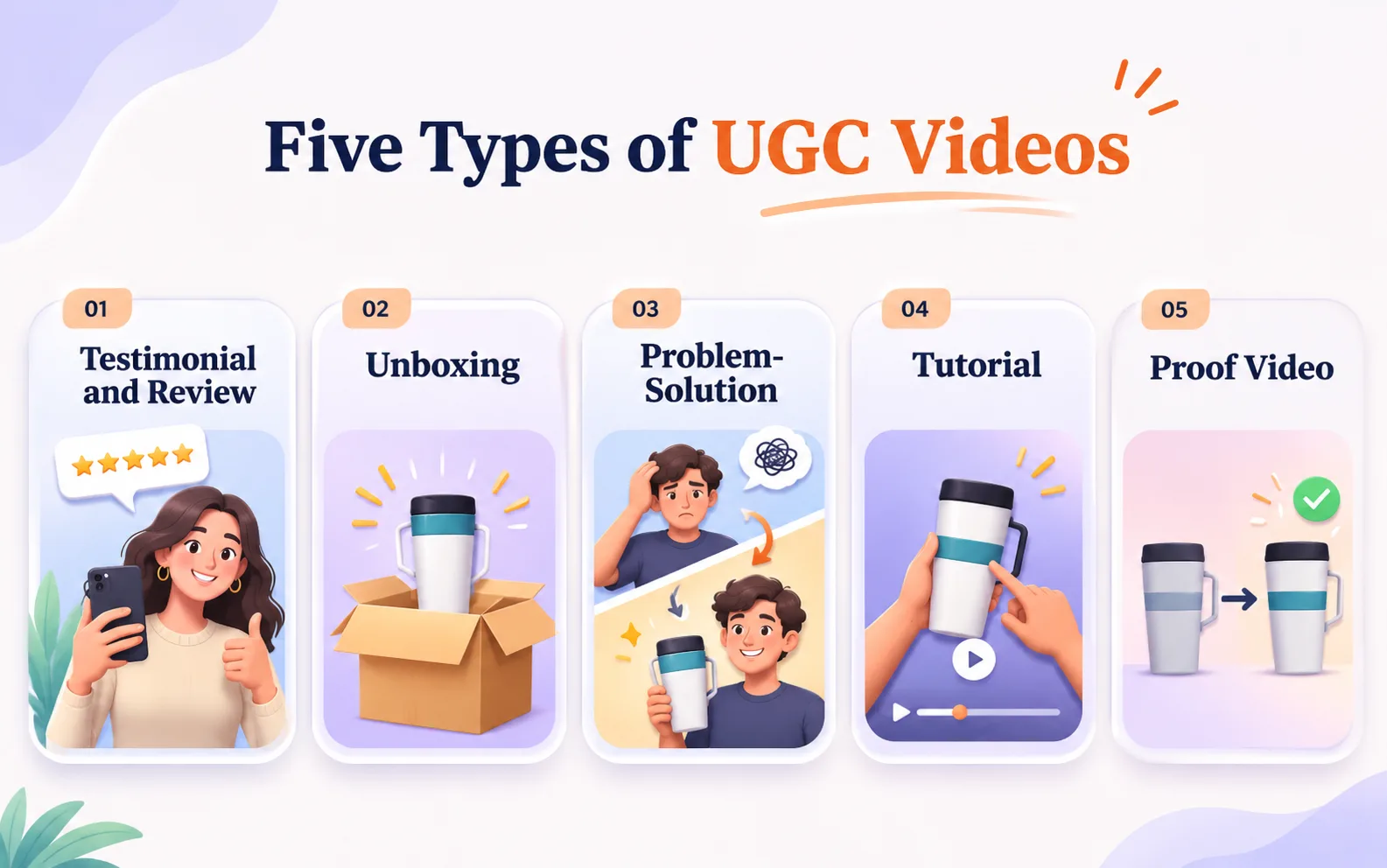
The table works as a quick selector. The breakdowns that follow show you what each type looks like on screen, where it goes wrong and what real evidence stands behind it.
5 Types of UGC Videos and How They Work
Each breakdown uses the same labels, so you can compare the types directly. Two short pieces of background come first, the timeline most UGC ads follow and the three numbers that show whether one worked. The hook lines are illustrative drafts we wrote to show the pattern. They are not quotes from real ads.
UGC Video Ad Structure and Timing
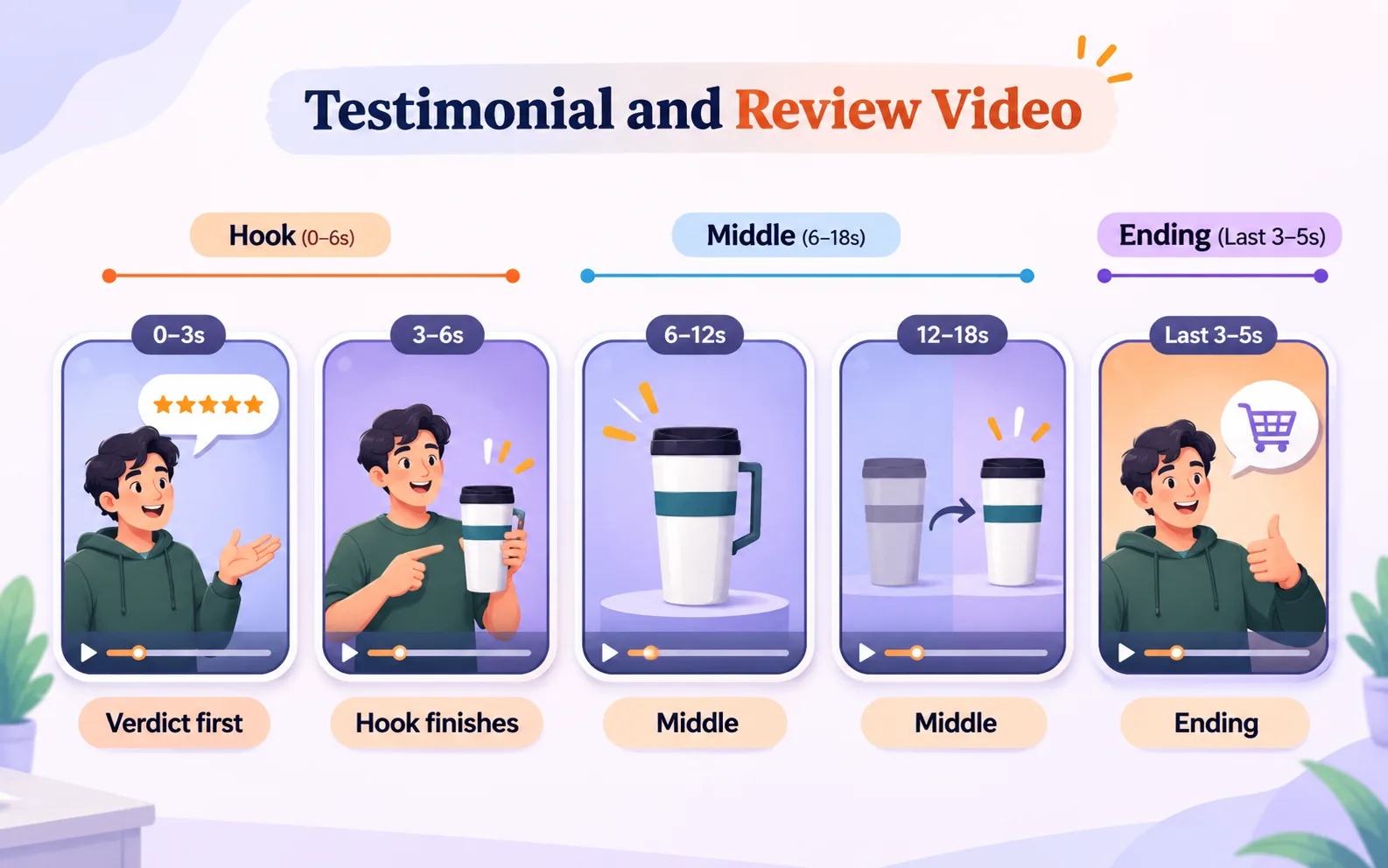
Most UGC videos built for ads follow the same four-part timeline, and each type below is a variation of it.
Part | Seconds | What it does |
|---|---|---|
Main message | 0 to 3 | Says what the video is about and why the viewer should care. State it here |
Hook | 0 to 6 | The opening moment that stops a viewer from scrolling past. It overlaps the main message and gives the viewer a reason to stay |
Middle | 6 to the last few seconds | Shows the product doing something the viewer can see |
Ending | Final 3 to 5 seconds | The last instruction, such as tapping to shop. Ask for one action |
The timing follows TikTok's ad guidance, last updated June 2025, which tells advertisers to put the main message in the first 3 seconds and the hook in the first 6. The same page recommends 5 to 10 words per second for on-screen text. Captions built into the picture appear even when the viewer's sound is off.
The middle stretches or shrinks to fit the runtime. A six-second ad has almost no middle, so its opening carries everything.
3 UGC Video Metrics to Track
Platforms name and count these differently, so write down your own definitions before you compare results.
Opening watch rate: The share of people who see the video and keep watching past three seconds. It shows how often the opening stopped the scroll.
Average watch time: How long viewers stay, on average.
Click rate: The share of views that lead to a click.
Each type below names the one that tells you most about it.
1. Testimonial and review videos
What it is: One person tells one specific story about using the product.
Hook patterns: A verdict ("I nearly sent this back and I'm glad I didn't"), a doubt ("I didn't think a water bottle could change my commute"), or a time frame ("Ninety days in, here is what changed").
Build: One take on a handheld phone, the product in frame most of the time, one concrete detail every five to eight seconds, and captions built into the picture.
What it does: Builds trust while the viewer compares options. TikTok's own ad guidance recommends featuring creators, employees or customers to capture attention.
What to watch: Average watch time. Clicks matter less because the video lowers doubt without asking for much.
Fails when: Every sentence is a benefit. Viewers hear a script and discount it. Brief the topics and let the wording vary.
Real example: Stepful, an online healthcare training platform, used student testimonials, music, on-screen text and influencers who explained the program and showed a day in the life, then boosted its best unpaid posts as ads. TikTok's case study reports that the cost of each sign-up lead fell from $23 to $13.29, with more than 85,000 form submissions. The results are brand-reported, and Stepful also switched to a lead-form campaign type, so the testimonials get only part of the credit.
Instruction for the creator: "Say what you expected before you tried it and what changed."
2. Unboxing and first-impression videos
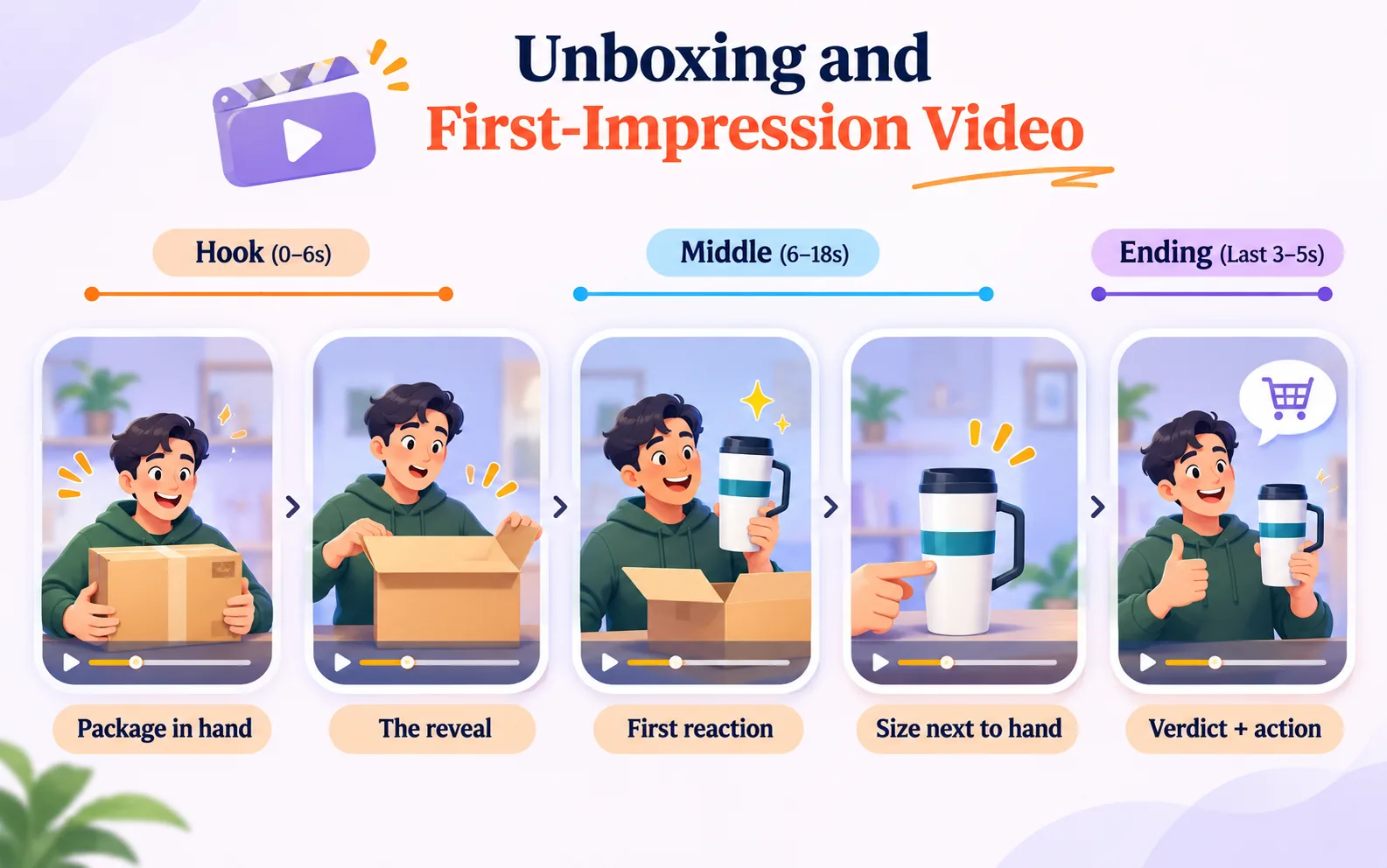
What it is: The first look at the product as it arrives, with the creator's live reaction.
Hook patterns: The package already in hand ("This just showed up and I have to show you the packaging"), a surprise ("I did not expect it to be this heavy"), or a question ("Is it as big as the photos?").
Build: Package, reveal, one detail you can feel such as weight, texture or size next to a hand, first use, then a verdict.
What it does: Shows what arrives at the door, a question product photos leave open. It works early, before the viewer has chosen a product.
What to watch: Opening watch rate, since the reveal is the whole opening.
Fails when: There is nothing to react to. A plain pouch gives the creator little to say, so an in-use format fits better. A staged surprise usually reads as staged.
Real example: Mobile accessories brand Acome worked with lifestyle creators on unboxing and review videos. TikTok reports that the best unboxing video collected more than 359,000 likes, 1,700 comments and 4,000 shares, and that the campaign delivered more than 480,000 clicks. These are brand-reported results.
Instruction for the creator: "Film the package before you open it and say what you notice first."
3. Problem-solution videos
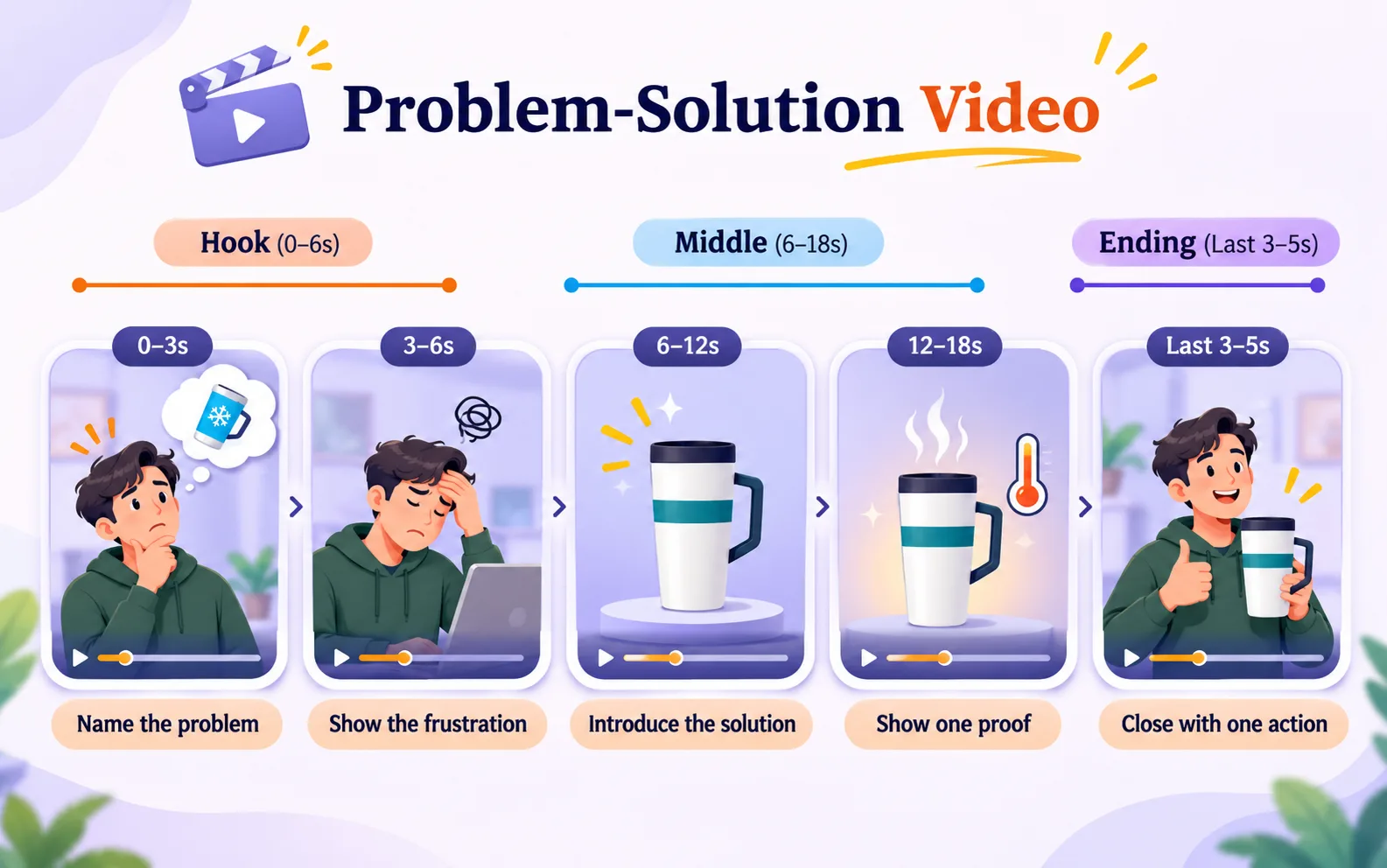
What it is: The creator names a problem the viewer recognizes, then shows the product resolving it.
Hook patterns: The annoyance in the viewer's words ("Why does my coffee go cold before I finish half of it"), a cost ("I wasted money on three of these before this one"), or a scene ("Every morning, same mess").
Build: The problem takes the first few seconds. The frustration happens in a real setting, the product enters early, one proof shot follows, and one action closes the video.
What it does: Drives purchases in social ads. The viewer recognizes their own situation and the product arrives as the answer.
What to watch: Opening watch rate and click rate. The opening is where versions differ most, so this type rewards testing.
Fails when: The problem is generic. "Keeps you organized" identifies nobody. Name the exact annoyance.
Guidance behind it: TikTok's creative tips tell advertisers to illustrate specific situations where the product would help the viewer and show it in use. We found no public case study that isolates a problem-solution clip with its own results, so treat this as a type to test and not a proven one.
Instruction for the creator: "Show the moment the problem happens, in the place it happens."
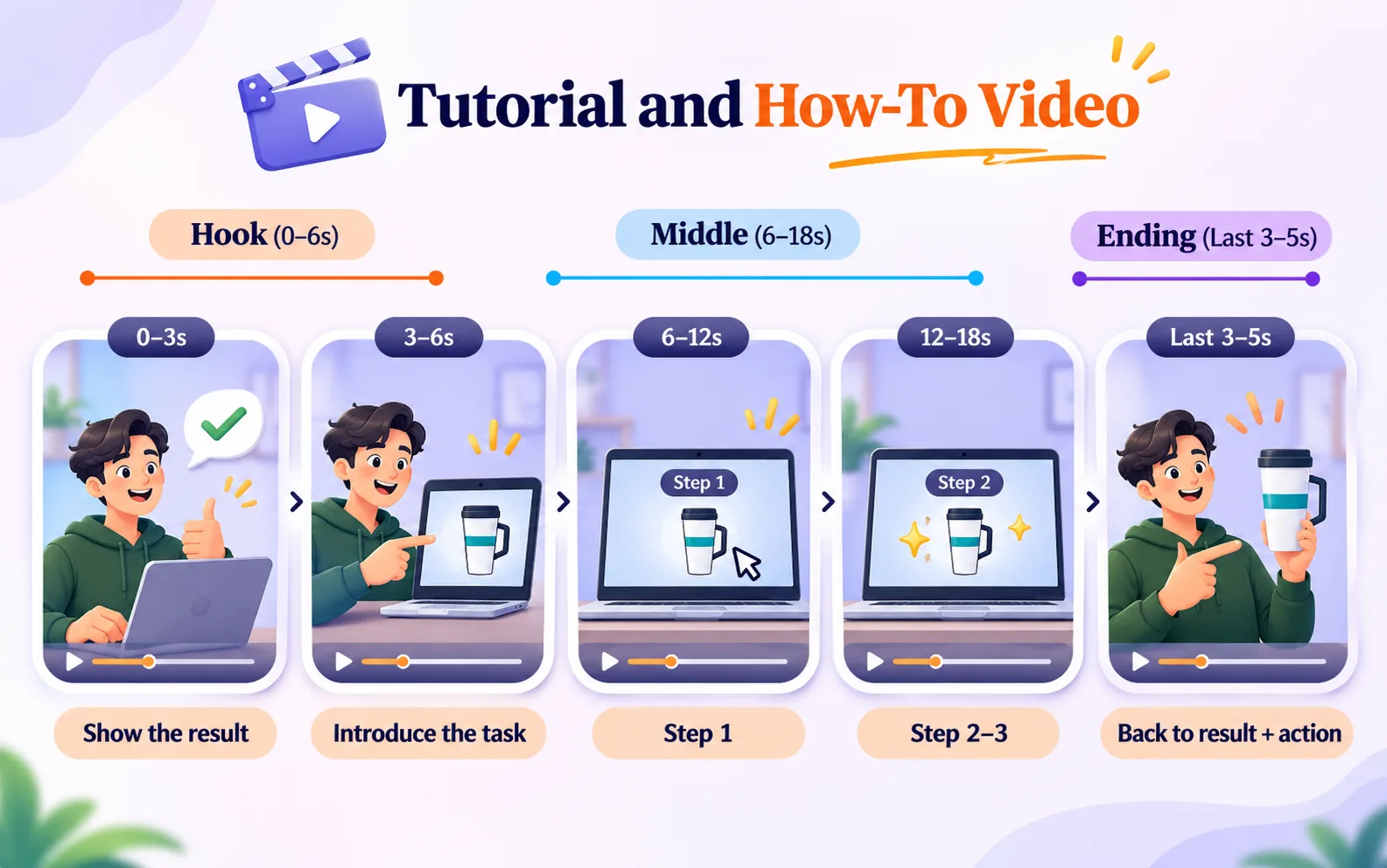
4. Tutorial and how-to videos
What it is: One task, shown start to finish by someone using the product.
Hook patterns: The finished result first ("Here is the finished result, and it took four minutes"), a shortcut ("The step most people skip"), or a common mistake ("What I got wrong the first time").
Build: Result, then steps with short on-screen text, the product named while in use, and a return to the result at the end.
What it does: Removes friction for products with steps or several uses. It works while the viewer compares options and on product pages.
What to watch: Average watch time through the steps. A drop at one step shows where the clip loses people.
Fails when: Too many steps share one clip. Cover one task per video and make a second video for the next.
Guidance behind it: TikTok's 2021 storytelling frameworks include a step-by-step format that captions each step against a key visual of the product and ends on a UGC-style reaction. They also include a results-first format that starts at the finished result and works backwards. Public case studies for tutorials are thin, so the same caution applies.
Instruction for the creator: "Pick one task and do it in real time, then speed up the slow parts."
5. Proof videos: before-and-after and durability demos
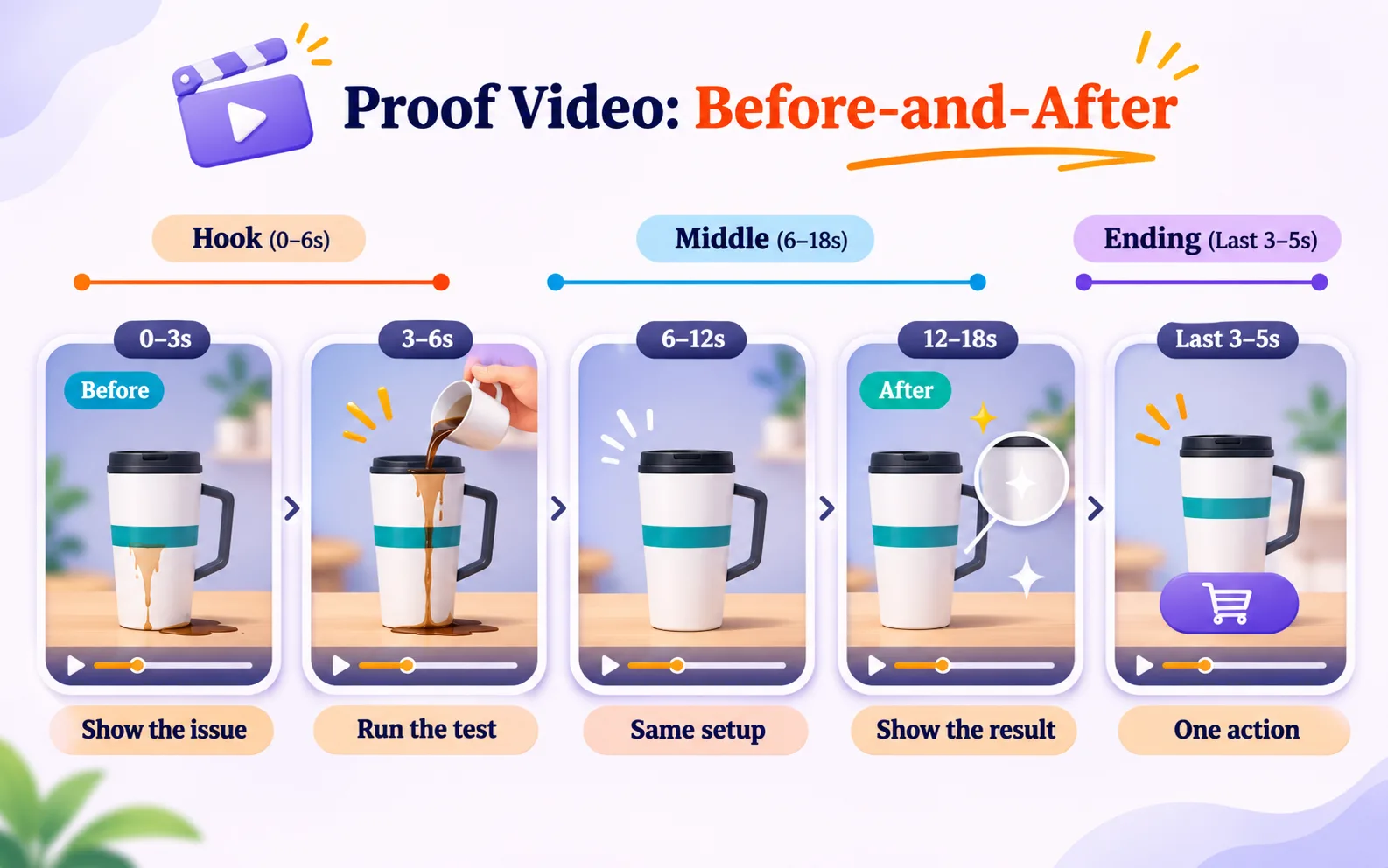
What it is: A visible change or a test result with the product at the center.
Hook patterns: The before state in frame one ("Day one"), the test setup ("I'm about to put this through the worst case I can think of"), or a claim someone doubts.
Build: Before, product use, after, with the same framing and lighting in both states so the product explains the difference. For a durability demo, put the evidence on camera and let the creator handle it.
What it does: Answers "will it work for me" without a sales line, close to the moment of purchase.
What to watch: Average watch time through to the reveal, since the after state is the payoff.
Fails when: Heavy editing or mismatched lighting makes the change look staged. Claims that cannot be backed up also create legal risk, so check what a creator says before the video runs as an ad.
Real example: The Stanley burned-car clip covered in the next section. The creator pulled a tumbler from the cup holder and shook it to show ice still inside, so the proof was visible and the claim came from the footage.
Instruction for the creator: "Film the before state on day one, in the same spot and light you will use for the after."
Viewers meet the five types as short clips on screen. How the content reaches a brand in the first place is a separate question, and four real cases show the range.
4 Real UGC Marketing Examples From Brands
UGC content for brands arrives by one of the three routes above. The four cases below show each route and what the brand did next.
1. Stanley's Viral Customer Video and Brand Response
The clip that opens this guide came from a TikTok user, and Stanley joined in afterward when its president replied with a video that played her clip first and offered to replace her car. HubSpot reports that the reply passed 32 million views. TikTok calls this format a stitch, a feature that attaches a clip of someone else's video to the start of your own.
You cannot order a video like this. The part you control is the reply, so decide in advance who may respond and how quickly.
2. GoPro's UGC Awards and Customer Content
When GoPro launched its awards program in 2015, payouts ranged from $500 for photos to $5,000 for edited videos. Its 2018 Million Dollar Challenge drew more than 25,000 submissions for a $1 million pool, and GoPro's own award entry says more than half its marketing material comes from its community. Modern Retail reports that submissions were reused in social posts and TV ads.
GoPro supplied every figure in this case, and all of them date from 2018. The model works partly because GoPro customers already film with the product, so check whether yours do before you copy it.
3. e.l.f.'s TikTok Hashtag Challenge
e.l.f. launched #eyeslipsface on October 4, 2019, and its release called it the first original music created for a TikTok hashtag challenge. A hashtag challenge asks users to post their own videos under a shared tag. The challenge began with videos from seven influencers and with paid promotion that included a paid placement filling the app's opening screen for a day.
The brand and its agency later reported 5 million videos from users and 7 billion views in an awards entry. The prompt asked viewers to copy a move to a song, so taking part needed no script, no product and no editing skill.
4. Nomi's Creator-Led UGC Ad Testing
Nomi's social ads had been running on static ads that audiences had tired of over two quarters, and its previous arrangement delivered two polished films a quarter. We moved it to monthly batches and cast creators per batch so faces stayed fresh. The result was 42 versions across a quarter and a 27% drop in the average cost of winning a customer, counted across all channels and compared with the previous quarter's static ads. The figure is client-reported, and only four of the versions did most of the work.
Results like these draw plenty of attention to UGC. Before you plan around them, check how far the wider statistics can be trusted.
UGC Statistics and What the Data Actually Shows
Most articles about UGC rely on one claim, that it leads to many times more purchases than other content. The figure behind that claim comes from Emplifi's comparison figures, which it gathers from many accounts.
Purchase rate is the share of visitors who buy. Emplifi's Q3 2025 report found purchase rates 10.38 times higher on social posts using UGC, with the average amount spent per order only 1.06 times higher. Its Q1 2026 figure was 6.73 times for pages featuring UGC, up from 4.27 times the quarter before, and its Q2 2026 figure was 19.88 times, comparing brands using its UGC product with brands that did not.
Read the range with care. The comparison groups change from quarter to quarter, and every customer in the data belongs to one vendor, so the figures show only that UGC tends to go with more purchases in that data. They cannot predict your result. We treat them as a reason to run a test and nothing more. A test only makes sense if UGC suits the problem in front of you, so confirm the fit next.
When UGC Videos Are Not the Right Choice
The evidence supports testing UGC where it fits. UGC answers doubt and does little for confusion. If your buyer does not understand your category, an explanation has to come first, and an explainer video does that job better than a creator's opinion. The usual split is explainers for people who do not know the product yet and product demos for people comparing options.
Two more cases call for caution. If you sell to businesses, where a group of people has to approve the purchase over a long period, you need material that survives being forwarded to people who never saw the creator, and a recorded product demo fits that better than creator clips. If you sell something with strict legal limits on what you can claim, such as health products, you need scripted wording, which removes much of what makes UGC credible.
If none of this applies to your product, UGC is worth a structured test, and the next section shows you how to run one.
Testing UGC Videos Before You Scale Them
If UGC fits your product, the next question is how many versions to make. One UGC video is a bet. An idea is one plan for a video, and a version is one take on that idea. TikTok's guidance recommends continuous testing and suggests three to five different creatives per ad group, with big differences between them while you explore. Our own planning figure is eight to fifteen live versions per idea, enough for a usable read within a normal budget cycle.
A set of openings
Explore big differences between ideas first, as TikTok suggests. Then take the idea that wins and build a set of openings, which is one idea with six to twelve different starts. The middle, the offer and the ending stay fixed, so any difference in results comes from the opening. Because the first seconds carry the most weight, the opening is the cheapest thing to vary.
Running a first batch
Pick one doubt: Use the doubt column in the types table and write it as a sentence.
Choose one format: Do not mix formats in the first batch.
Write one middle: Fix the product proof, the offer and the ending.
Write six to twelve openings: Vary the verdict, the doubt, the cost and the scene.
Name every file by idea, opening and middle: A name like Idea3-Opening7-Middle1 tells whoever manages your ad spend what changed.
Read the results with the table below: Then write the next batch from what won.
A worked example
Take a tumbler brand whose buyers worry about spills. The doubt is "will it leak in my bag." The format is a proof video. The fixed middle shows the tumbler tipped over in a bag with papers inside. Eight openings you could test read as follows.
"Everyone asks me if this spills, so I put papers underneath."
"I am about to throw this in my bag with my laptop."
"Three tumblers leaked on me before this one."
"Spill test, day one."
"My commute bag has seen things."
"Watch what happens to the paper."
"I do not trust any lid, so I tested this one."
"Leak test with a laptop sleeve underneath."
Same middle, eight openings, one question for the data.
Reading the results
Use the three numbers explained earlier to find which part of a video to change. Change one part at a time so each result ties to one cause.
Symptom | Likely cause | What to change |
|---|---|---|
Low opening watch rate | The opening does not stop the scroll | Test new openings and keep the middle the same |
Good opening watch rate but short average watch time | The middle is slow or unclear | Shorten it and show the proof sooner |
Good watch time but few clicks | The ending or the offer is weak | Test the wording and placement of the final instruction |
Clicks but few purchases | The page the ad sends people to, or the offer, does not match the video | Fix the page before changing the video |
What it costs
A managed monthly batch that includes finding creators, editing and a monthly report starts at $2,200 at AllCapStudio. A monthly batch makes sense if you run social ads and have someone who reads the results. For a single testimonial on a product page, ask a customer directly or brief one creator and skip the program.
Who makes the clips
A freelancer, an in-house hire and a studio carry different costs and failure points, and the right fit depends on how often your formats change. Longer films run on a different clock, with stage-by-stage timelines from about a week for a small project to nine weeks for a brand film.
Once the batch is planned and costed, each creator needs a brief that says exactly what to film.
How to Write a UGC Creator Brief (With an Example)
A tested idea needs clear written instructions for the creator, called a brief, and a good one fits on one page. Here is the brief we would write for the tumbler proof video above, and you can adapt it.
Objective: Show that the tumbler does not leak in a bag.
Doubt: "Will it leak?"
Format: Proof video, 15 to 25 seconds, vertical.
Must show: The lid closed, the tumbler tipped over, the paper afterward.
Must not say: Anything about being leak-proof forever, unless the brand can back it up.
Delivery: Keep text and captions away from the edges where the app's buttons and captions cover the picture. For Reels ads, Meta's specs leave about 14% at the top, 35% at the bottom and 6% on each side free of text and logos.
Permission: Where the video can run and for how long, agreed in writing before filming.
Disclosure: A line on how the paid relationship will be shown.
Length decides how much script fits. In our work, typical runtimes for UGC video ads sit between 6 and 45 seconds, so 15 to 25 seconds sits comfortably inside the range. A spoken script runs at about 150 words per minute at a standard pace, so a 15-second clip holds roughly 35 words once you allow for pauses.
For a clip with several scenes, sketch a storyboard template with a vertical frame and a timing line under each panel. The timings show whether the scenes fit the runtime before the creator films.
The brief names the doubt and the proof and leaves the wording to the creator, so you control what is shown and the creator controls how it sounds. The next section covers the last two lines, permission and disclosure.
UGC Video Rights, FTC Disclosures, and AI Labels
Permission and disclosure carry legal weight, and a third issue, AI labels, keeps changing as platforms update their rules. Each deserves a line in every brief you send.
Permission
Permission to run a video means written agreement on where it can run and for how long. Unprompted and invited UGC needs the creator's written permission before it runs as an ad. Hired work should state the platforms and the duration in the contract. In creator-led ad work, finding and hiring creators normally covers casting, briefing and permission to run the videos, and we agree terms before filming. Agreeing terms after a clip starts winning is slower and costlier than agreeing them first.
Disclosure
Disclosure means telling viewers when a creator was paid or received free products from the brand. The FTC's guidance for social media influencers says a message should make it obvious when the endorser has a "material connection" with the brand, and the agency publishes a plain-language Disclosures 101 guide for creators and brands. Check every cut before it runs, and keep the disclosure when you reuse paid creator content. Treat this section as general information and check specifics with a lawyer.
AI labels
AI-generated creator video is footage made by AI instead of filmed with a person, and it can help test openings in volume. Platforms have been adding labeling and disclosure rules for ads, and the rules differ by platform and change often. Check each platform's current ad policy before you run it. We label AI-assisted UGC when we use it and tell clients when it may cost more in trust than it saves in budget.
With these three handled, the testing program above can scale without surprises.
Tracking UGC Video Performance and Results
The lasting value of a UGC program is the record it builds. Every batch you run shows you which doubts your buyers carry, which openings stop them and which creators they believe. Keep that record in one place, with the opening, the format, the creator and the result beside each clip, and your next brief starts from evidence instead of a blank page. A brand that treats every video as a one-off pays again for lessons it already learned.
Keep a second record beside it. Platform rules on disclosure and AI labels will keep shifting, and the clips you can adapt fastest are the ones where you know who filmed them, what permission you hold and whether AI touched them. Write those three facts down when a video is approved, and a policy change becomes an afternoon of checking instead of a rebuild. The brands that keep both records spend their time improving their videos while others sort through old files.
If you would rather have a studio run the first batch, we find and brief the creators, edit the clips and write a monthly report on what performed. Send AllCapStudio a brief and you will get a written scope, a price and a schedule, usually within two working days.
Written by the AllCapStudio team. We publish what we would tell you on a call, which occasionally costs us the project.
Read next
All articles- JournalBest Motion Graphics Software for Product Videos and Brand Animation (2026)Revisions, repeat versions and tight deadlines are the hardest part of creating motion graphics for product videos and brand…
- Journal10 Best Remotion Alternatives for Non-Developers (2026)Compare 10 Remotion alternatives for non-developers, from free open-source tools to AI agent studios and template APIs, with…
- JournalInstagram Reel Size Guide (2026): Dimensions, Safe Zones and Export SettingsInstagram Reel size is 1080 × 1920 in 9:16. See how feeds and grids crop it, where text stays visible and which export settings to…